What Does SEO-Optimised Mean? A Practical Guide for Better Search Visibility
Creating an SEO-optimised website means making it easier for search engines to understand your pages and for people to find useful answers. It is not simply a matter of repeating keywords. Strong search engine optimisation (SEO) combines helpful content, clear page structure, a good user experience and sound technical foundations.
Whether you run a small business, publish a blog or manage an online shop, an SEO-optimised approach can help your pages reach people who are already looking for what you offer. This guide explains the essentials and shows how to improve a page without making it feel written for search engines alone.
What Is an SEO-Optimised Page?
An SEO-optimised page is planned and written to meet a specific search need. It gives readers a clear, reliable answer while helping search engines identify the page’s subject and value. This can involve choosing relevant search terms, organising information with headings, writing a descriptive page title and making sure the page works well on mobile devices.
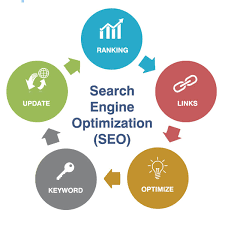
SEO is an ongoing process rather than a one-off task. Search behaviour, competitors and search engine systems can change, so it is sensible to review important pages regularly.
Understand What Your Audience Is Searching For
Start by considering the questions your intended readers ask. A person searching for “how to choose running shoes” is likely looking for advice, while someone searching for “buy trail running shoes” may be ready to shop. Understanding this difference helps you create content that matches the purpose behind a search.
Useful ways to research search intent include:
- Listing questions customers ask before making a decision.
- Reviewing related searches and suggestions in search engines.
- Checking which types of pages currently appear for your chosen topic.
- Using keyword research tools to compare search terms and topics.
Choose one main topic for each page. Related phrases can appear naturally where they help explain the subject, but there is no need to force every variation into the copy.
Write Helpful, Original Content
Content is at the heart of an SEO-optimised website. Aim to answer the reader’s question clearly, provide practical detail and make the next step easy to understand. Avoid vague claims and unnecessary filler. Where appropriate, support advice with examples, evidence or first-hand experience.
Before publishing, ask:
- Does the page answer the main question?
- Is the information accurate and up to date?
- Does it offer something useful beyond a brief summary?
- Can a reader understand it without specialist knowledge?
- Is the next step clear?
Originality matters. Rewriting another website’s content without adding value is unlikely to serve readers well. Create a page that reflects your own knowledge and meets the needs of your audience.
Use Clear Titles and Headings
A clear page title helps readers and search engines understand what a page covers. Keep it accurate, specific and concise. A useful title might include the main topic, but it should still read naturally.
Use headings to organise the page into logical sections. The main heading, marked as <h1>, should describe the page. Use subheadings such as <h2> and <h3> to make the content easier to scan. Headings should describe the section that follows rather than exist solely to include keywords.
Make Your Page Easy to Use
A good page should be straightforward to read and navigate on both desktop and mobile. Use short paragraphs, descriptive links and a layout that helps readers find information quickly. Make sure buttons and menus are easy to use, and avoid intrusive pop-ups that interrupt the experience.
Page speed is also important. Large image files, unnecessary scripts and poor hosting can slow a site down. Compress images, remove features you do not need and check performance on mobile as well as desktop.
Improve the Technical Foundations
Technical SEO helps search engines access, understand and index your website. You do not need to be a developer to check some basic points:
- Important pages can be reached through clear navigation and internal links.
- Your website uses HTTPS.
- Pages display correctly on mobile devices.
- Images have descriptive file names and useful alternative text where needed.
- Broken links and duplicate pages are addressed.
- Search engines are not accidentally blocked from essential pages.
For larger or more complex websites, a technical audit can help identify problems that are not obvious during everyday use.
Use Internal Links and Descriptive URLs
Internal links connect related pages on your website. They help readers discover further information and give search engines context about how your content fits together. Use link text that describes the destination, such as “read our guide to local SEO”, rather than a vague phrase such as “click here”.
Keep URLs short and readable where possible. A clear address such as example.co.uk/seo-guide is easier to understand than a long string of numbers and symbols. Avoid changing established URLs without a plan to redirect them, as this can disrupt visitors and search engines.
Measure Results and Keep Improving
SEO results can take time, and rankings are affected by many factors. Track useful measures such as organic visits, search impressions, clicks, enquiries and sales. Search analytics tools can help show which pages are performing and what people search for before visiting your site.
Use this information to improve pages thoughtfully. You might clarify an answer, update outdated details, add helpful examples or improve a page’s title. Do not make changes just to add more keywords; the goal is to make the page more useful.
Common SEO Optimisation Mistakes to Avoid
- Keyword stuffing: Repeating a phrase unnaturally makes content harder to read.
- Writing for rankings alone: Content should serve visitors, not just search engines.
- Publishing duplicate or thin pages: Each page should have a clear purpose and provide genuine value.
- Ignoring mobile users: A page that is difficult to use on a phone can frustrate visitors.
- Expecting instant results: SEO usually requires consistent effort and review over time.
Frequently Asked Questions
How do I make a page SEO-optimised?
Choose a clear topic, understand the search intent, write useful and original content, use descriptive titles and headings, improve the user experience and check that search engines can access the page.
How many times should I use a keyword?
There is no ideal number. Include the main phrase where it fits naturally, such as in the title or introduction, and use related wording when it helps readers. Clarity and relevance matter more than a fixed keyword count.
How long does SEO take to work?
There is no guaranteed timescale. Results depend on factors such as competition, website quality, the topic and the work being done. Some improvements may be noticed sooner than others, but building lasting visibility generally takes time.
Build a Better SEO-Optimised Website
An SEO-optimised website brings together relevant content, clear structure, technical reliability and a positive experience for visitors. Begin with the needs of your audience, make each page genuinely useful and review performance over time. A consistent, people-first approach gives your content a stronger foundation for search visibility.
7 Essential Tips for SEO Optimisation
- Use relevant keywords naturally in titles and headings.
- Write clear, useful content that answers searchers’ questions.
- Create concise, descriptive meta titles and descriptions.
- Use short, readable URLs with relevant keywords.
- Add descriptive alt text to images.
- Make pages fast, mobile-friendly and secure.
- Earn quality backlinks from relevant websites.
Use relevant keywords naturally in titles and headings.
Use relevant keywords naturally in your titles and headings to make each page’s topic clear to readers and search engines. Choose phrases that reflect what people are genuinely searching for, then fit them into concise, descriptive wording. Avoid forcing keywords where they sound awkward: clear, helpful headings make content easier to scan and create a better reading experience.
Write clear, useful content that answers searchers’ questions.
Write clear, useful content that directly answers the questions people are searching for. Organise information logically, use plain language and include practical details that help readers take their next step. When content genuinely meets your audience’s needs, it is more valuable to visitors and better positioned to perform well in search results.
Create concise, descriptive meta titles and descriptions.
Write a concise, descriptive meta title and description for every important page. The title should sum up the page’s main topic and include a relevant search phrase where it fits naturally, while the description should give readers a clear reason to visit. Keep both accurate and distinctive, and avoid keyword stuffing or promises the page does not fulfil. Search engines may sometimes display different text, but well-written metadata can help people understand your page and decide whether it’s relevant to their search.
Use short, readable URLs with relevant keywords.
Use short, readable URLs that clearly describe the page and include its main keyword where it fits naturally. A simple address such as example.co.uk/seo-tips is easier for people to understand, remember and share than a long URL full of numbers or unnecessary words. Keep URLs concise and use hyphens to separate words, but avoid forcing in extra keywords or changing established URLs without setting up appropriate redirects.
Add descriptive alt text to images.
Add descriptive alt text to images so people using screen readers can understand what each image shows, while also giving search engines useful context. Keep the wording concise and specific, describing the image in its page context rather than stuffing it with keywords. If an image is purely decorative and adds no information, use empty alt text so assistive technology can skip it.
Make pages fast, mobile-friendly and secure.
Make your pages fast, mobile-friendly and secure to give visitors a better experience and support your SEO efforts. Compress images, limit unnecessary scripts and check that pages load smoothly on different devices and screen sizes. Use HTTPS to protect information exchanged with your website, and test your pages regularly so you can spot and fix performance or usability issues.
Earn quality backlinks from relevant websites.
Earn quality backlinks from relevant websites to strengthen your site’s authority and help search engines understand how your content relates to your industry. Focus on creating useful, original resources that others genuinely want to reference, and build relationships with reputable publishers, organisations and businesses in your field. A few relevant, trustworthy links are more valuable than a large number of unrelated or paid links, which can undermine your SEO efforts.